Information for Chairpersons & Speakers
Presentation Format
All presentations will be delivered on-site as oral presentations. There will be no poster sessions.
Time Allocation for Presentation and Discussion/Q&A
| Session Type | Presentation Time | Discussion / Q&A |
|---|---|---|
| Presidential Lecture | Set for each session Notified to speakers in advance |
|
| Educational Lecture | ||
| Symposium | ||
| Clinical Debate | ||
| Genome Discussion | ||
| General Oral Presentation | 7 minutes | 3 minutes |
Speaker's Check-in
Prior submission of presentation data is not required. Please visit the PC Desk on the day for confirmation and a test run.
Preparing Presentation Data
Both the slides and presentation language have been communicated to the speakers in advance. Please check the acceptance notification via email or on the website.
Conflict of Interest Disclosure
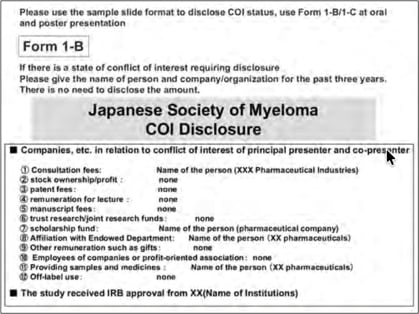
All authors are required to disclose any Conflict of Interest (COI) with a biotechnology manufacturer, a
pharmaceutical company, or other commercial entity that has an interest in the subject matter or materials
discussed in the manuscript within the period of 36 months prior.
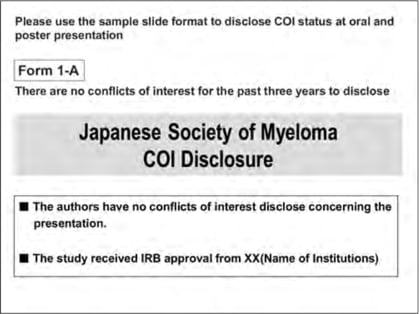
Please insert the attached COI disclosure slide (both Japanese and English versions are available). The slide template
can be downloaded from the “Information for Chairs & Speakers” page on the Annual Meeting website.
Ethical Considerations
If your presentation pertains to clinical or basic research that required approval from an ethics committee or your institution, please state on your slides (or poster) that approval has been obtained.
Guidelines for Session Chairs
- Please be seated at the Next Chair’s Desk in the lecture hall no later than 20 minutes before the scheduled start of your session so that on-site staff can confirm your arrival.
- Please ensure that your session is conducted and completed within the allotted time.
Guidelines for Speakers
Please come to the PC Desk located in the foyer on the 4th floor of Congress Square Grand Green Osaka to check and test your data no later than 45 minutes before your presentation.
| Hours: | Friday, May 22, 12:30–18:00 |
| Saturday, May 23, 8:30–18:00 | |
| Sunday, May 24, 8:30–15:00 |
Also, please be seated at the Next Speaker’s Desk 10 minutes prior to your presentation. Please strictly adhere to the time limits and follow the Chair’s instructions during your session.
Presentation Environment
| Windows | Mac | |
|---|---|---|
| Bringing your own PC | Yes | Yes |
| Bringing media (USB flash drive) | Yes | No |
| Applications | PowerPoint 2016 or later | PowerPoint; Keynote |
| Video software | Windows Media Player | - |
For those who bring only data
- On the day of your presentation, please visit the PC Desk no later than 45 minutes before your scheduled time to verify your slides on a preview PC (data submissions are also accepted on days other than your presentation day).
- Acceptable media: USB flash drive.
- Please ensure with up-to-date antivirus software that your media is free of viruses before bringing it to the venue.
- Only system-standard Windows fonts will be available.
- All presentation PCs are set to Full HD (1920×1080).
- If your slides include video or audio, please inform the staff when registering your data.
- If there are referenced files such as videos, please place all related files in the same folder as the presentation file.
- Notes on video files (Windows): Please bring video files that can be played with the codecs included by default in Windows 10 and Windows Media Player 12 (WMV format is recommended).
- After creating your presentation data, please check in advance that it runs properly on a PC other than the one used to create it.
- Please note that data cannot be modified in the presentation room.
- After preview, the data will be transferred to the presentation room. At the start of your talk, the first slide will be displayed in Slide Show mode on the screen; please advance your slides yourself using the mouse and keyboard on the lectern.
- Your presentation data will be temporarily stored on the PC Desk server and the room PCs and will be responsibly deleted after the conclusion of the meeting.
- Presenter View is not available.
For those presenting on your own PC
- Please come to the PC Desk at least 45 minutes before your scheduled presentation time.
- Confirm cable connections using the preview monitor at the PC Center. HDMI cables will be provided at the PC Center.
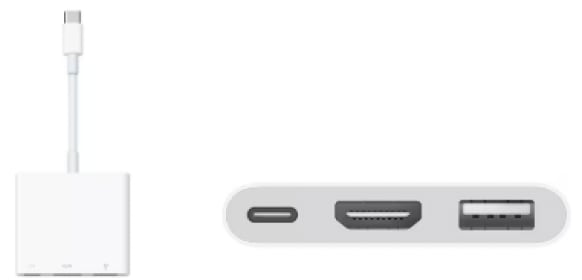
- Some laptops (e.g., certain Mac models) require a dedicated (sold separately) adapter—please be sure to bring it.
- Please verify that your laptop outputs correctly to an external display. As settings vary by PC and OS, please check in advance.
- Create a desktop shortcut (alias) to your presentation data in an easy-to-find location, named “PresentationNo_ SpeakerName” (e.g., O-1_Myeloma Taro).
- Screen resolution: Full HD (1920×1080).
- If you will use video or audio, be sure to inform staff when checking your data.
- Disable screen savers and power-saving settings in advance. If your system requires a password at startup, please disable it beforehand.
- AC power outlets will be available in the room; please bring your AC adapter. About 20 minutes before your presentation (even during an ongoing lecture), please come to the PC desk near the front left of the lectern in the hall and hand your PC to the staff. They will connect the cables and confirm external output.
- During your presentation, please use the monitor, mouse, and keyboard set on the lectern. Presenter View cannot be used.
- Please be sure to bring backup data. Data cannot be modified in the presentation room.
- Your PC will be returned to you at the PC desk near the front left of the lectern. Due to limited space, please collect your PC promptly after your session.
- Presenter View is not available.